News Mode

Headlines Without
the Doomscroll.

Top headlines rotating gently on your desk display — from the sources you choose, in the categories you pick. Stay informed without ever falling into the feed.
Top Headlines Multiple Sources No Feed No Ads
Founding Batch · 110+ backers secured · Ships October 2026
No Subscription Wi-Fi Setup in 2 Min All Modes Included
Headlines Only — By Design
4 Feeds World · Biz · Tech · Sports
0 Ads Ever, On Screen
SkyWatch News Mode desk display
The Headlines.
Nothing Else.

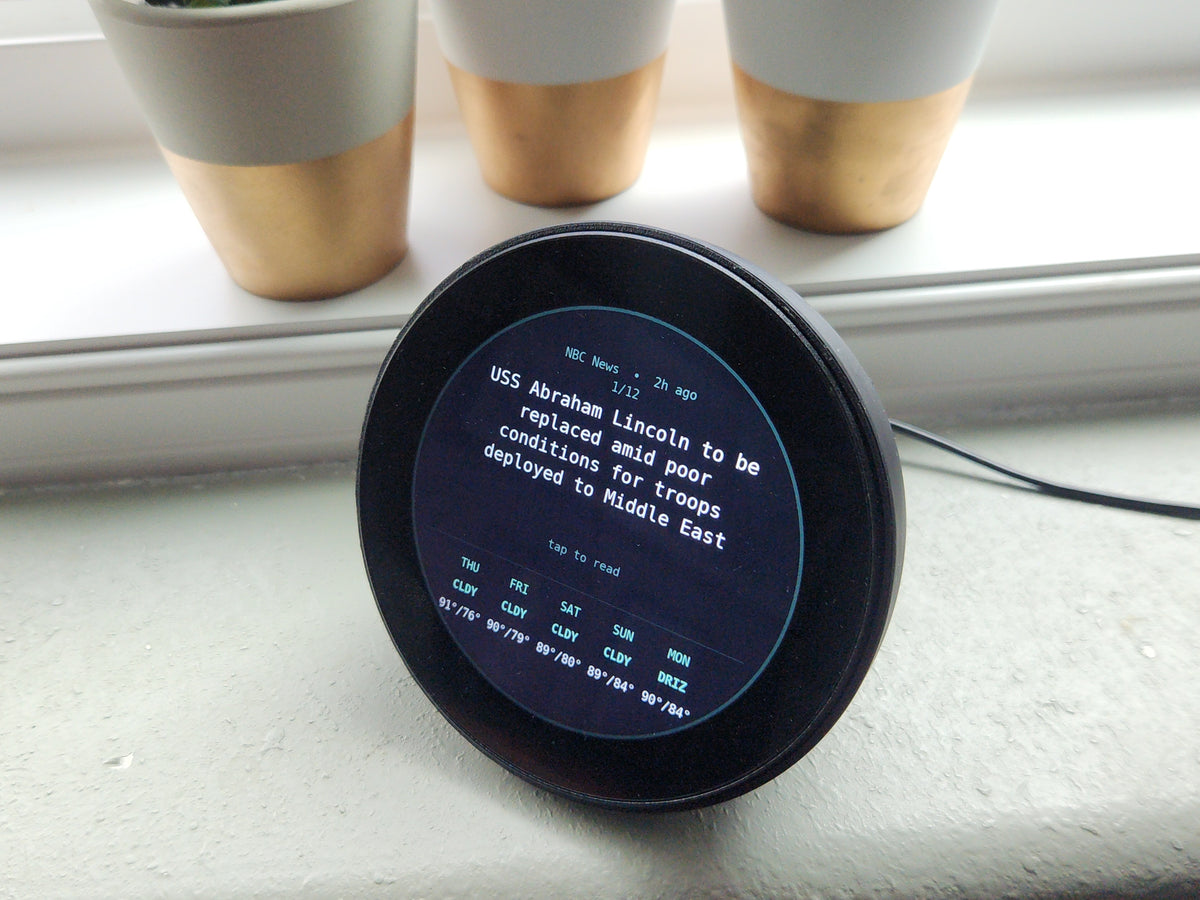
News mode turns SkyWatch into a calm, ambient news display — the day's top stories at a glance, with none of the machinery built to keep you scrolling.

Rotating Top Headlines

The day's most important stories cycle gently across the display, one headline at a time, on a rotation speed you control. No scrolling, no refreshing — the news comes to you at a calm, readable pace.

Category Selection

Choose exactly which categories appear: World, Business, Tech, and Sports. Follow all four, or trim it down to just the one that matters to you. Configure once from the app — change it any time.

Source Variety

Headlines are drawn from multiple established news outlets and wire services — not a single feed with a single slant. Each headline shows its source, so you always know where a story is coming from.

Breaking News Emphasis

When a genuinely major story breaks, it's flagged with a distinct breaking badge and moves to the front of the rotation — so the display whispers most of the day and only raises its voice when it matters.

Headline-Only Format

You see the headline and the source — and that's it. No article body, no related stories, no "you might also like." There is no rabbit hole to fall down, because there's nothing to click.

Quiet Hours Scheduling

Set quiet hours from the app and News mode goes dark on schedule — evenings, weekends, deep-work blocks, whatever you choose. The display switches to another mode or dims until your news window opens again.

Ambient Awareness
Informed,
Not Consumed.

Most news sources want to hold your eye as long as possible. SkyWatch News Mode is engineered around the opposite principle: give you the facts quickly, cleanly, and ambiently, then get out of your way.

1
The Feed Is the Problem News apps aren't built to inform you — they're built to keep you. Infinite scroll, outrage-ranked feeds, and autoplay exist to stretch a 10-second check into a 20-minute session, 14+ times a day.
2
The Headline and Nothing Else News mode gives you the headline, the source, and the category — then rotates to the next one. You get the awareness. The feed gets nothing. If a story truly matters, you'll choose to go deeper on your own terms.
3
A Productivity Investment Reclaim even half of those daily check-ins and SkyWatch pays for its $249 price in weeks, not years. It's an ambient awareness device: the news stays on your desk — and out of your head — until you actually need it.
Built for People
Taking Their Attention Back.

The Recovering Doomscroller

You deleted the news apps twice and reinstalled them twice. News mode breaks the loop: the headlines you actually wanted are already on your desk, so the phone stays face-down — and the feed loses its excuse.

The Busy Professional

You need to know what's moving in the world — markets, tech, major events — without burning focus between meetings. One peripheral glance at the scope replaces a dozen app check-ins a day.

The Morning-Routine Person

Coffee, headlines, done. News mode gives you the day's top stories while the kettle boils — then quiet hours can shut it off for the rest of the morning so your routine stays yours.

0 Ads No sponsored stories, no banners, no promoted anything. Your $249 buys the device — you're the customer, not the product.
0 Comment Sections The news without the argument underneath it. No replies, no ratios, no strangers shouting — just the headline.
2s Mode Switch Done with the news? One tap and SkyWatch is back to planes, ships, or your watchlist in about two seconds.
Common
Questions
News mode aggregates headlines from multiple established news outlets and wire services across its four categories — World, Business, Tech, and Sports — rather than pulling from a single feed. Every headline is displayed with its source name, so you always know where a story comes from, and the mix of outlets means you're not seeing one publication's editorial slant all day. The source lineup is maintained server-side, so coverage improves over time without any firmware fuss on your end.
Yes. From the companion app you choose any combination of World, Business, Tech, and Sports. Run all four for a broad rotation, or narrow it to a single category — only Tech headlines at your desk, for example. You can also set how quickly headlines rotate and schedule quiet hours when News mode switches off entirely. Change your setup any time; the display updates within seconds.
No — and that's deliberate. News mode shows the headline, the source, and the category, and nothing more. There's no article body, no related-stories rail, and nothing to tap through to, because the entire point is to keep you informed without opening a door back into the feed. If a headline genuinely matters to you, you'll seek out the full story deliberately, on your own schedule — which is a very different thing from being pulled into one.
Yes. Any of the four categories can be switched off from the app, so if you'd rather never see Sports — or want a news diet of World headlines only — that's a toggle away. Combine category selection with quiet hours scheduling and you get full control over both what appears and when: business headlines during work hours, nothing at all after 6pm, for instance. And remember, News mode is just one of 16+ modes — switch away entirely whenever you like.
SkyWatch — $299
Pre-Order

Includes News mode + all 16+ other modes. No subscription, ever.

$299 $350 Save $50

Full refund before it ships · Cancel any time · No questions asked